
Weekly ClickUp Report to Microsoft Teams
One HTML message in Teams every Thursday morning. Past week done, next week planned, grouped by workstream.
The problem
"Our weekly project update was a 20-minute manual assembly job every Thursday morning, and the person on it always missed one workstream. We needed the same report to just show up."
The solution
One flow. Every input type.
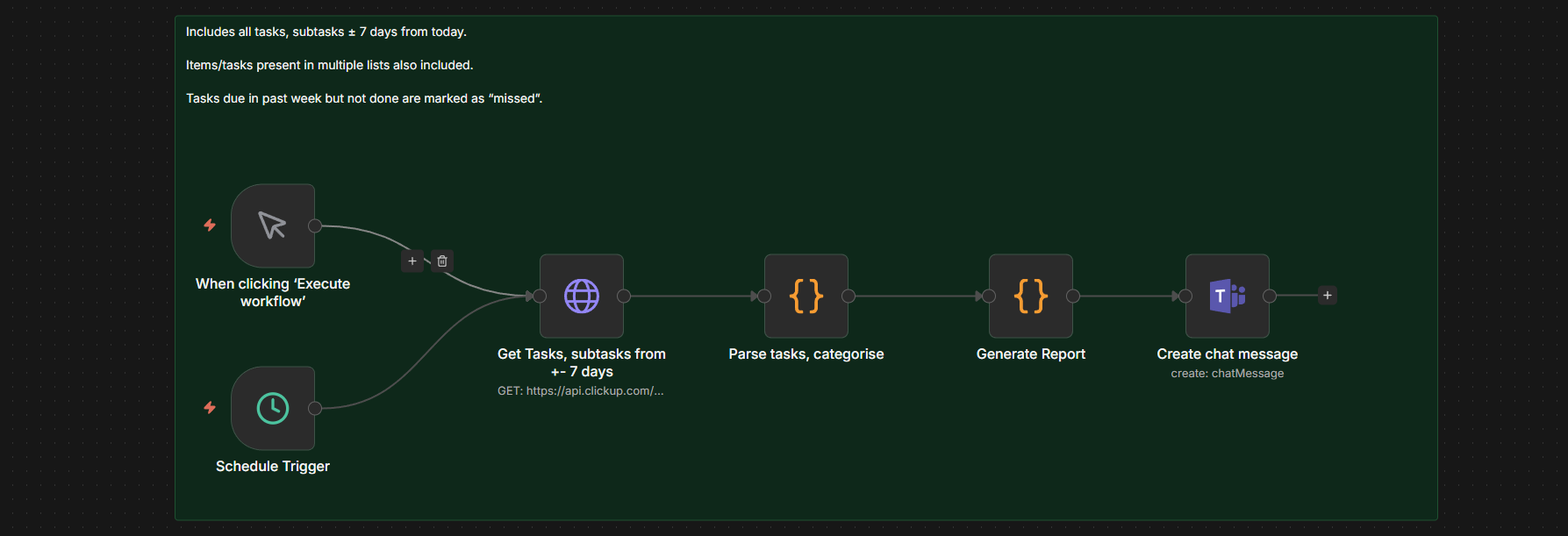
The scheduled trigger fires weekly on Thursdays at 10am. It queries ClickUp for all tasks and subtasks with due dates within 7 days back or 7 days forward, includes closed items so 'done last week' is captured, then parses each task's category from a custom field. The 'Productivity' bucket is explicitly filtered out (personal admin, not client-facing). Categories are sorted alphabetically, each rendered as a section with 'Last 7 days' items (name only, no status noise) and 'Next 7 days' items with formatted MM/DD due dates. The final HTML posts to Teams via the Microsoft Teams node.
Results
Industry
Ops / Client Delivery
Service type
Client Automation
Timeline
3 days
Tools used